
[1] 10.725LLMs as Coding Support Tools
wk9-d01-llms-intro
Dr. D
Chico State
DATA 385 - Fall 2026
October 20, 2026
Goals
- Superficial view of how an LLM works.
- What goes wrong when it writes code for you
- Practice with broken and bloated code
- Question of what you should allow it to do
Warm up: Quick reading share
Turn to your neighbor. Share one thing you found interesting in the Drexel paper. (2 minutes)
Clippy: the OG program assistant
Thankfully we can do better now.
Wikipedia contributors. (2026, October 9). Office Assistant. In Wikipedia, The Free Encyclopedia. Retrieved October 15, 2026, from https://en.wikipedia.org/wiki/Office_Assistant. Image © Microsoft Corporation, via Wikipedia (File:Clippy-letter.PNG).
What is an LLM?
- A large language model (LLM) is a program trained to do one thing: given some text, predict what text comes next.
- ChatGPT, Claude, Gemini and Copilot are all LLMs, or are built on one.
- Your phone’s autocomplete does the same job. An LLM is that idea at a much, much larger scale.
That is all it does. Answering a question, explaining an error, or writing R code is next-piece prediction, repeated one piece at a time.
It predicts the next piece, with probabilities
Text is chopped into tokens: chunks that are often a word or part of a word (for example, “unbelievable” might become “un”, “believ” and “able”). At each step the model gives every possible next token a probability, then picks one.
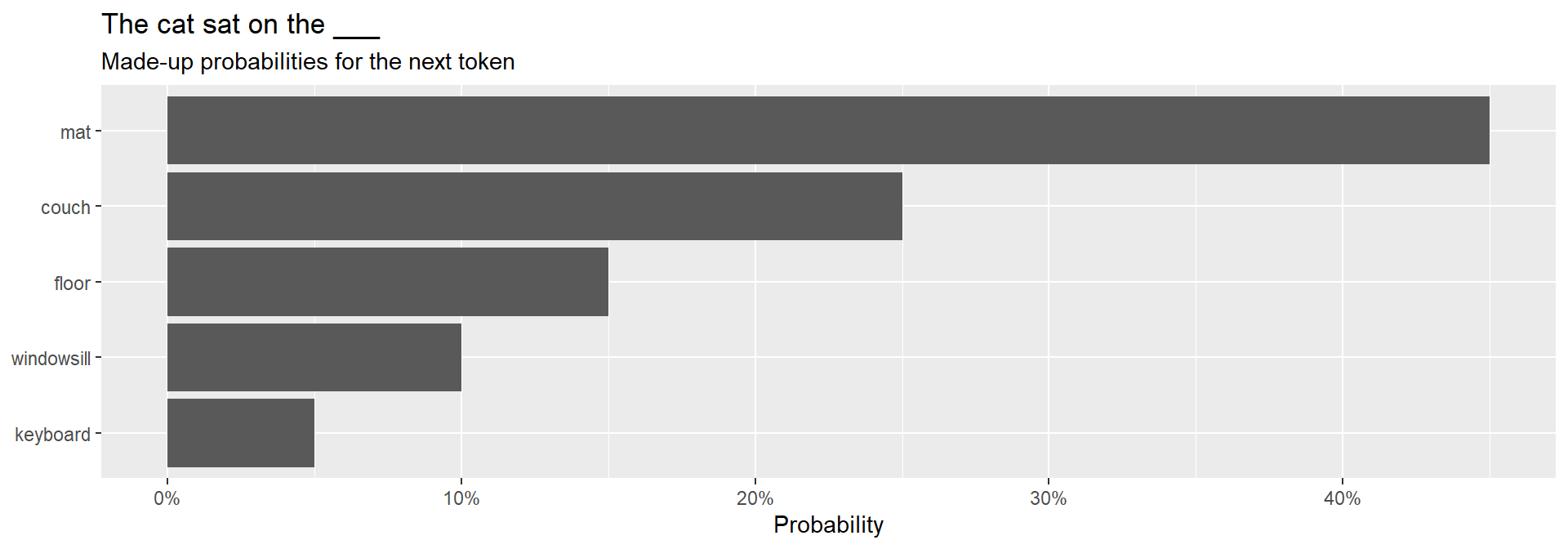
These numbers are made up. A real model spreads probability over tens of thousands of tokens at every step.
Where does it learn this?
- It is trained on a huge pile of text: books, websites, forums, and a lot of code.
- It learns patterns in how text and code tend to continue. It does not look facts up in a database.
- Then it is tuned further using human ratings, so it answers like a helpful assistant instead of just continuing your sentence.
Being tuned to be helpful is part of why it sounds so sure of itself, and feels like it’s always .
Demo: same prompt, twice
There is randomness built in. The model samples from its probabilities instead of always taking the top choice, so the same prompt can give different answers.
Prompt
Write R code that counts how many penguins are in each species.What the model sees
- Only your prompt and the conversation so far.
- It cannot see your data, your files, or your R session unless you paste them in (which you MUST be careful of!)
- In a plain chat window it does not run your code. It predicts what code and output would look like.
With no data in front of it, the model has to guess what your data looks like.
LLMs are…
Good at
- boilerplate and common patterns
- syntax you forgot
- explaining an error message
- translating code between languages
- a first draft to react to
Bad at
- functions and arguments that do not exist
- outdated syntax
- knowing your data
- admitting it is unsure
- being correct when it sounds sure
AI Slop
# Step 1: make sure penguins is a data frame
library(palmerpenguins)

if (!is.data.frame(penguins)) {
  stop("penguins must be a data frame")
}
print("Confirmed: penguins is a data frame.")

# Step 2: make a working copy so we do not modify the original
penguins_copy <- as.data.frame(penguins)
print(paste("There are", nrow(penguins_copy), "rows in this data set."))

# Step 3: check the column types
if (!is.character(penguins_copy$species) && !is.factor(penguins_copy$species)) {
  penguins_copy$species <- as.character(penguins_copy$species)
}
if (!is.numeric(penguins_copy$body_mass_g)) {
  penguins_copy$body_mass_g <- as.numeric(penguins_copy$body_mass_g)
}

# Step 4: find the unique groups
species_list <- unique(as.character(penguins_copy$species))
species_list <- species_list[!is.na(species_list)]
species_list <- sort(species_list)
print(paste("Found", length(species_list), "unique species:",
            paste(species_list, collapse = ", ")))

# Step 5: split the data into one chunk per species
chunks <- list()
for (i in seq_along(species_list)) {
  keep <- penguins_copy$species == species_list[i] & !is.na(penguins_copy$species)
  chunks[[species_list[i]]] <- penguins_copy[keep, ]
}

# Step 6: calculate the mean body mass for each chunk
results <- data.frame(species = character(0), mean_mass = numeric(0),
                      stringsAsFactors = FALSE)
for (j in seq_along(chunks)) {
  chunk <- chunks[[j]]
  values <- chunk$body_mass_g
  values <- values[!is.na(values)]
  if (length(values) > 0) {
    m <- sum(values) / length(values)
  } else {
    m <- NA_real_
  }
  new_row <- data.frame(species = names(chunks)[j], mean_mass = m,
                        stringsAsFactors = FALSE)
  results <- rbind(results, new_row)
}

# Step 7: sort, reset the row names, and print
results <- results[order(results$species), ]
rownames(results) <- NULL
print("All done! Here are the results:")
print(results)
Talk with your neighbor - what does this do? (5 min)
That meeting coulda been an email
Why LLM code gets bloated
- It learned from a lot of code that was written defensively: extra checks, extra steps, error handling.
- A helpful answer feels like a thorough answer, so it adds more.
- It does not know your data, so it guards against every possibility instead of the real ones.
In the Drexel paper, the LLM’s difficulty labels were consistent and confident, and they did not match how hard students found the questions. Consistent is not the same as correct.
Advice - Be bossy. Be really bossy.
- Don’t assume it’s always right, ask it to explain or justify it’s reasoning
- Trust but verify. Run the code
- Use an instructions file (e.g. AGENTS.md, CLAUDE.md) to have it store your preferences such as
- writing tone (conversational vs instructional)
- how “chipper” or “helpful” it is
- whether or not you want it to offer suggestions
- how long the responses should be (control the word vomit)
- the style of coding (tidyverse vs base, pandas vs polars)
- Other?
You own what you submit
- Unnecessary complexity is a cost. More code means more to misread, debug and maintain.
- You own what you submit. If you cannot explain a line, you cannot defend it, catch when it is wrong, or fix it later.
- Simpler is usually more correct.
Functions
What is a function?
- Takes inputs, does some steps, and gives you back a result
mean(),filter(),read_csv()- custom functions are super powerful
- give a name to a set of steps, so you can run them again with different inputs.
You will get more formal instruction on how to create a function next week.
Parts of a function
add_taxis the name.priceandrateare the inputs.ratehas a default value.- The steps go inside the curly braces.
- The last line is what you get back.
We will use functions in AE07