Grammar of data wrangling
wk3-d01-grammar-wrangle
Chico State
DATA 385 - Fall 2026
September 8, 2026
Setup
🎥 Grammar of wrangling - code along in wk3-d01
A grammar of data wrangling…
… based on the concepts of functions as verbs that manipulate data frames
select: pick columns by namearrange: reorder rowsslice: pick rows using index(es)filter: pick rows matching criteriadistinct: filter for unique rowsmutate: add new variablessummarise: reduce variables to valuesgroup_by: for grouped operations- … (many more)
Rules of dplyr functions
- First argument is always a data frame
- Subsequent arguments say what to do with that data frame
- Always return a data frame
- Don’t modify in place
Data: Hotel bookings
- Data from two hotels: one resort and one city hotel
- Observations: Each row represents a hotel booking
- Goal for original data collection: development of prediction models to classify a hotel booking’s likelihood to be cancelled (Antonio et al., 2019)
Source: TidyTuesday
First look: Variables
 [1] "hotel"                          "is_canceled"
 [3] "lead_time"                      "arrival_date_year"
 [5] "arrival_date_month"             "arrival_date_week_number"
 [7] "arrival_date_day_of_month"      "stays_in_weekend_nights"
 [9] "stays_in_week_nights"           "adults"
[11] "children"                       "babies"
[13] "meal"                           "country"
[15] "market_segment"                 "distribution_channel"
[17] "is_repeated_guest"              "previous_cancellations"
[19] "previous_bookings_not_canceled" "reserved_room_type"
[21] "assigned_room_type"             "booking_changes"
[23] "deposit_type"                   "agent"
[25] "company"                        "days_in_waiting_list"
[27] "customer_type"                  "adr"
[29] "required_car_parking_spaces"    "total_of_special_requests"
[31] "reservation_status"             "reservation_status_date"
Second look: Overview
Rows: 119,390
Columns: 32
$ hotel                          <chr> "Resort Hotel", "Resort Hotel…
$ is_canceled                    <dbl> 0, 0, 0, 0, 0, 0, 0, 0, 1, 1,…
$ lead_time                      <dbl> 342, 737, 7, 13, 14, 14, 0, 9…
$ arrival_date_year              <dbl> 2015, 2015, 2015, 2015, 2015,…
$ arrival_date_month             <chr> "July", "July", "July", "July…
$ arrival_date_week_number       <dbl> 27, 27, 27, 27, 27, 27, 27, 2…
$ arrival_date_day_of_month      <dbl> 1, 1, 1, 1, 1, 1, 1, 1, 1, 1,…
$ stays_in_weekend_nights        <dbl> 0, 0, 0, 0, 0, 0, 0, 0, 0, 0,…
$ stays_in_week_nights           <dbl> 0, 0, 1, 1, 2, 2, 2, 2, 3, 3,…
$ adults                         <dbl> 2, 2, 1, 1, 2, 2, 2, 2, 2, 2,…
$ children                       <dbl> 0, 0, 0, 0, 0, 0, 0, 0, 0, 0,…
$ babies                         <dbl> 0, 0, 0, 0, 0, 0, 0, 0, 0, 0,…
$ meal                           <chr> "BB", "BB", "BB", "BB", "BB",…
$ country                        <chr> "PRT", "PRT", "GBR", "GBR", "…
$ market_segment                 <chr> "Direct", "Direct", "Direct",…
$ distribution_channel           <chr> "Direct", "Direct", "Direct",…
$ is_repeated_guest              <dbl> 0, 0, 0, 0, 0, 0, 0, 0, 0, 0,…
$ previous_cancellations         <dbl> 0, 0, 0, 0, 0, 0, 0, 0, 0, 0,…
$ previous_bookings_not_canceled <dbl> 0, 0, 0, 0, 0, 0, 0, 0, 0, 0,…
$ reserved_room_type             <chr> "C", "C", "A", "A", "A", "A",…
$ assigned_room_type             <chr> "C", "C", "C", "A", "A", "A",…
$ booking_changes                <dbl> 3, 4, 0, 0, 0, 0, 0, 0, 0, 0,…
$ deposit_type                   <chr> "No Deposit", "No Deposit", "…
$ agent                          <chr> "NULL", "NULL", "NULL", "304"…
$ company                        <chr> "NULL", "NULL", "NULL", "NULL…
$ days_in_waiting_list           <dbl> 0, 0, 0, 0, 0, 0, 0, 0, 0, 0,…
$ customer_type                  <chr> "Transient", "Transient", "Tr…
$ adr                            <dbl> 0.00, 0.00, 75.00, 75.00, 98.…
$ required_car_parking_spaces    <dbl> 0, 0, 0, 0, 0, 0, 0, 0, 0, 0,…
$ total_of_special_requests      <dbl> 0, 0, 0, 0, 1, 1, 0, 1, 1, 0,…
$ reservation_status             <chr> "Check-Out", "Check-Out", "Ch…
$ reservation_status_date        <date> 2015-07-01, 2015-07-01, 2015…
Select a single column
View only lead_time (number of days between booking and arrival date):
# A tibble: 119,390 × 1
   lead_time
       <dbl>
 1       342
 2       737
 3         7
 4        13
 5        14
 6        14
 7         0
 8         9
 9        85
10        75
# ℹ 119,380 more rows- Start with the function (a verb):
select() - First argument: data frame we’re working with,
hotels - Second argument: variable we want to select,
lead_time - Result: a data frame with 119390 rows and 1 column
Note
dplyr functions always expect a data frame and always yield a data frame.
You try it: one column
Your turn
Select a single column of your choice — not lead_time. Before you run it, predict: how many rows and how many columns will the result have?
Select multiple columns
View only the hotel type and lead_time:
You try it: multiple columns
Your turn
Now select two or more columns of your choice. Same question — how many rows and how many columns do you expect this time?
Data wrangling, step-by-step
What if I wanted to sort the results by the lead time?
Select:
Select, then arrange:
# A tibble: 119,390 × 2
   hotel        lead_time
   <chr>            <dbl>
 1 Resort Hotel       737
 2 Resort Hotel       709
 3 City Hotel         629
 4 City Hotel         629
 5 City Hotel         629
 6 City Hotel         629
 7 City Hotel         629
 8 City Hotel         629
 9 City Hotel         629
10 City Hotel         629
# ℹ 119,380 more rows
Note the introduction of a new operator called a “pipe”: %>%.
Pipes
What is a pipe?
In programming, a pipe is a technique for passing information from one process to another.
# A tibble: 119,390 × 2
   hotel        lead_time
   <chr>            <dbl>
 1 Resort Hotel       737
 2 Resort Hotel       709
 3 City Hotel         629
 4 City Hotel         629
 5 City Hotel         629
 6 City Hotel         629
 7 City Hotel         629
 8 City Hotel         629
 9 City Hotel         629
10 City Hotel         629
# ℹ 119,380 more rows- Start with the data frame
hotels, and pass it to theselect()function, - then we select the variables
hotelandlead_time, - and then we arrange the data frame by
lead_timein descending order.
Aside
The pipe operator %>% is implemented in the package magrittr, though we don’t need to load this package explicitly since tidyverse does this for us.
Recently (<2 yrs ago) Base R implemented it’s own pipe: |> that functions the exact same way as %>%. That allows you to use this feature without having to load a separate package.
And yes.. i’m sorry but this | vertical bar is also called a “pipe” in certain situations.
How does a pipe work?
You can think about the following sequence of actions: find keys, unlock car, start car, drive to work, park.
Expressed as a set of nested functions in R pseudocode this would look like:
Writing it out using pipes gives it a more natural (and easier to read) structure:
A note on piping and layering
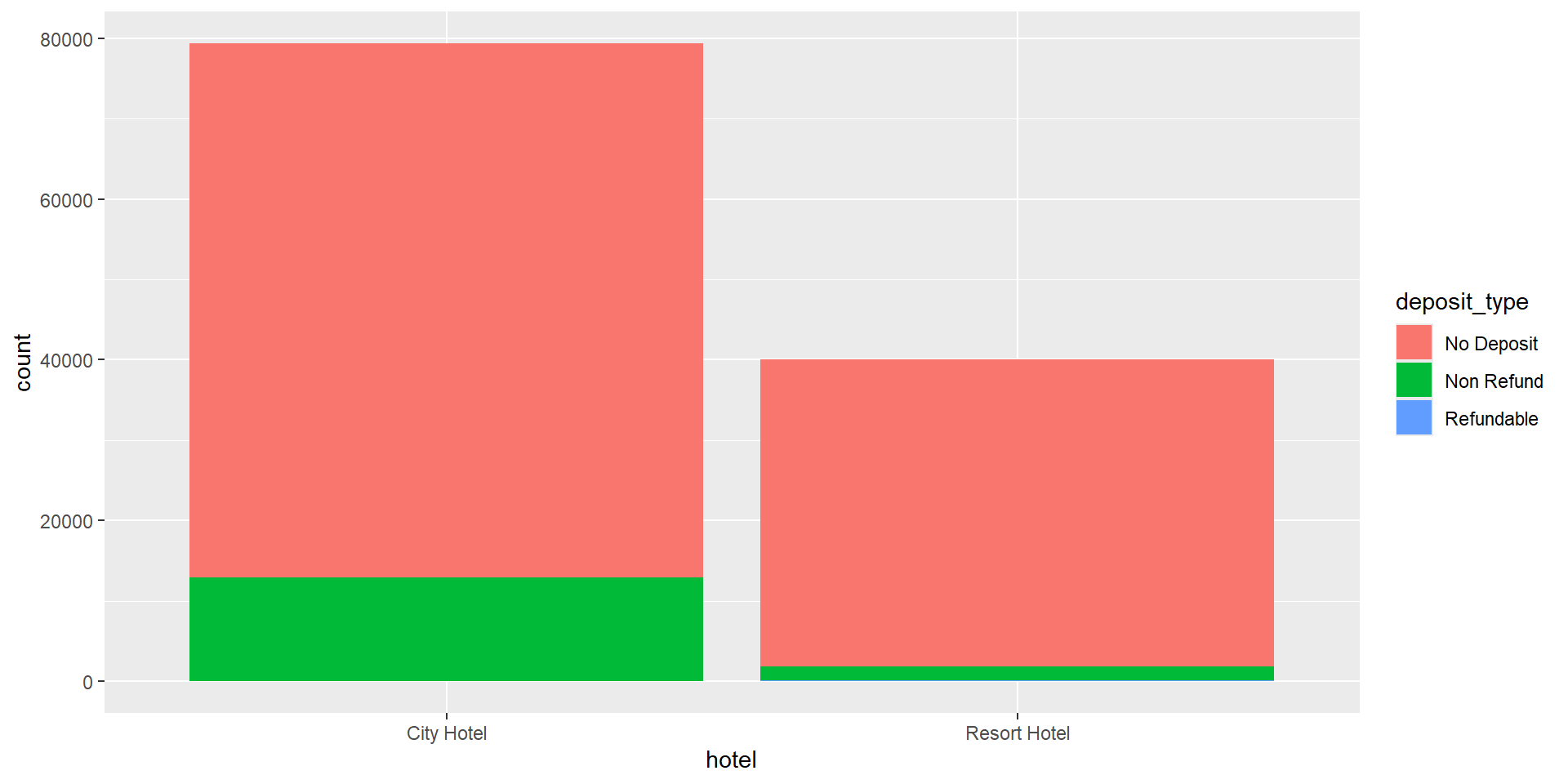
%>%(or|>) used mainly in dplyr pipelines: we pipe the output of the previous line of code as the first input of the next line of code+used in ggplot2 plots is used for “layering”: we build the plot in layers, separated by+
dplyr uses %>%, not +
ggplot2 uses +, not %>%
Code styling
Many of the styling principles are consistent across %>% and +:
- always a space before
- always a line break after (for pipelines with more than 2 lines)
❌
✅
You try it: pipe it together
Your turn
Using the same columns you picked in “You try it: multiple columns,” write one pipe: hotels |> select(...) |> arrange(...).
Acknowledgements & Credits
Note
This page adapts material from Data Science in a Box (Unit 2, Deck 6: “Grammar of data wrangling”) by Mine Çetinkaya-Rundel, licensed under CC BY-SA 4.0. Source: tidyverse/datascience-box. Modified: converted from xaringan to Quarto revealjs. You try it’s added.